TV-Wall 3D Models Download for Architectural Visualization
The Definitive Guide to Sourcing Realistic TV-Wall 3D Assets
The modern home is defined by its focal points. In contemporary interior design, the integrated TV-Wall unit has transcended its function as mere media storage; it is now the primary architectural centerpiece, dictating flow, mood, and aesthetic sophistication. For 3D artists and architects, accurately rendering this feature is paramount to achieving visual immersion and securing client approval.
However, finding high-quality, perfectly scaled, and realistically textured TV-Wall 3D Models can be a persistent challenge. Low-quality assets often break the illusion, failing to capture subtle material reflections or complex joinery details.
This comprehensive guide, brought to you by add3ds, is designed to eliminate guesswork. We detail the critical standards for realism, explain why add3ds is your ultimate repository, and offer a clear path to instantly downloading the assets you need—whether they are free, high-utility samples or premium, project-defining masterpieces.
Why the TV-Wall Model is the Centerpiece of Your Render
In the competitive world of architectural visualization (ArchViz), details matter. A stunning render can be instantly undermined by a poorly constructed or low-resolution media unit.
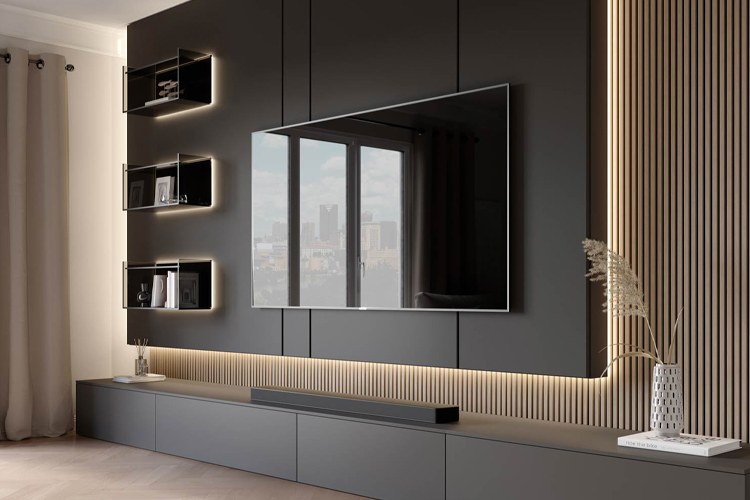
The TV-Wall system often involves complex interactions between materials: wood veneers, concrete textures, metallic accents, and integrated LED lighting. A truly realistic model must handle all these elements seamlessly, ensuring that the light refracts and reflects accurately across surfaces.
1.1. The Shift from Standalone Units to Integrated Architecture
Historically, a TV unit was simply a piece of furniture placed against a wall. Today's high-end designs feature custom paneling, recessed storage, hidden cabling systems, and complex floating components that merge the wall and the cabinet into a single architectural entity.
When searching for TV-Wall 3D Models, you must prioritize assets that reflect this integration, featuring clean topology that supports close-up shots and high-resolution textures suitable for 4K renders.
Decoding Realism: What Defines a High-Quality TV-Wall Model?
Realism is not just about visual appeal; it's about technical precision. At add3ds, every model is rigorously checked against industry benchmarks to ensure peak performance and visual fidelity. Here are the four non-negotiable criteria for truly realistic TV-Wall assets:
A. Optimized and Clean Topology (Mesh Structure)
A model’s topology—the arrangement of its polygons—determines how smoothly it deforms and how quickly rendering software can process it.
- Low Polycount for Efficiency: While realism demands detail, efficiency demands optimization. Our premium models feature carefully optimized polycounts, ensuring your scene runs smoothly without sacrificing crucial details like chamfered edges or subtle bevels.
- Clean Geometry: Look for clean quad-based geometry rather than messy triangles. This guarantees compatibility with subdivision surfaces and makes UV unwrapping accurate.
B. Physically Based Rendering (PBR) Textures
PBR is the gold standard for material rendering. It ensures that the digital materials behave exactly as their real-world counterparts under various lighting conditions.
- Material Maps: High-quality TV-Wall models must include dedicated PBR maps (Albedo/Diffuse, Roughness, Metalness, Normal/Bump, and Displacement). These maps are essential for showing the subtle sheen of lacquered surfaces or the minute imperfections in raw wood textures.
C. Perfect Real-World Scaling
Nothing breaks immersion faster than an object that is slightly the wrong size. All add3ds assets are built to accurate, real-world metric and imperial dimensions. This ensures drop-and-go functionality, allowing immediate integration into your scene without time-consuming rescaling.
D. Software and Renderer Compatibility
A professional asset must be versatile. Our library ensures compatibility across the leading industry software packages, including:
- 3ds Max (.max): Optimized for V-Ray and Corona Renderer.
- Blender (.blend): Native Cycles and Eevee support.
- SketchUp (.skp): Lightweight versions suitable for fast scene setup.
- FBX and OBJ: Universal formats for maximum flexibility across other platforms.
The add3ds Collection: Your Source for Premium TV-Wall 3D Models
While many resources offer a fragmented collection of digital furnitures, add3ds specializes in curating highly sought-after, complex architectural elements. Our library of TV-Wall 3D Models is consistently updated, reflecting the latest trends in international interior design, from minimalist Scandinavian styles to luxurious, modern stone installations.
3.1. Navigating the Collection and Downloading Assets
The add3ds platform is designed for efficiency. Use our intuitive filtering system to quickly isolate models based on key criteria:
- Style: Modern, Contemporary, Classic, Industrial.
- Material: Wood, Concrete, Marble, Gypsum, Metal.
- Complexity: Simple floating shelves vs. large multi-panel units with integrated fireplaces.
- Format/Renderer: Filter by the exact file type you need (.max V-Ray, .blend, etc.).
3.2. Free vs. Premium: Making the Right Choice
We understand that artists require flexibility. Our strategy is built around empowering both students and large studios:
Free Models (High-Quality Samples)
Our free TV-Wall 3D Models are not leftovers; they are meticulously crafted assets offered to showcase the quality standard of our entire library. These are perfect for:
- Testing model functionality in your preferred rendering engine.
- Practicing lighting and texturing techniques.
- Small personal projects or educational use.
Premium Models (Unrivaled Detail and Exclusivity)
For high-stakes commercial projects, premium models offer superior value. They feature:
- Exclusive Design: Unique, complex designs not available anywhere else.
- Advanced Components: Often include rigged doors, complex integrated lighting, or multiple material variations within the package.
- Dedicated Support: Priority access to support for technical issues or integration challenges.
Choosing premium assets guarantees a level of uniqueness and detail that elevates your presentation above competitors.
4. Workflow Integration: Tips for Maximizing Model Use
Downloading the perfect TV-Wall model is only half the battle; integrating it smoothly into your scene is key to success.
4.1. Lighting the Centerpiece
Since the TV-Wall is the focus, ensure your lighting design draws attention to its textures and details.
- Integrated Lighting: If the model includes LED strips or downlights, ensure they are correctly set up as mesh lights or area lights rather than simple emissive materials. This provides realistic soft illumination and ambient occlusion.
- Reflectivity Check: Before finalizing the render, perform a quick clay render (with standard gray material) to verify that your light sources are interacting correctly with the model’s reflective surfaces (e.g., glass shelves or glossy panels).
4.2. Scale and Context
Even if the model is perfectly scaled, ensure it looks appropriate within the context of the room. A massive TV unit in a small room can look disproportionate. Use the surrounding elements—the sofa, the coffee table, and the ceiling height—to confirm the perceived scale is accurate.
Conclusion: Elevate Your Architectural Renders Today
The quality of your TV-Wall 3D Models directly impacts the believability and professionalism of your visualizations. By choosing assets that adhere to rigorous standards of topology, PBR texturing, and real-world scale, you ensure that the centerpiece of your interior design shines brightly.
At add3ds, we take pride in being the definitive source for these mission-critical assets, providing the precision and realism that separates good work from great work. Explore our extensive library today, sample our free assets, and discover the premium models ready to transform your next project.